Hello @Jude2, just letting you know that I merged your thread with this one as I think you were kindly replying to @Scarlet1 
1 Like
Hello Sue ryder team & thank you. Im struggling with this website,because i was trying to reply to someone who lost her parents also when she was very young ( ireland possibly), but finding it impossible to locate individual posts, cant get back to post i was following despite finding ’ loss of sibling’ part.
Thanks, Judy
1 Like
Hi Judy - the way ive found it easiest to keep track of conversations i want to follow is find the conversation, then at the bottom of the conversation you can click on “topic controls” and select “bookmark”. Then at any point you can access all your bookmarks by clicking on your profile icon top right of screen then select the bookmark icon  hope this helps!
1 Like
Hi, thanks foryour advice - im still struggling with this site & wil have2back out. Im extremely computer literate, but the strange layout & lack of continuity are making it difficult for me to navigatr- i cant see if ive actually sent a message either,. And
Theres no " send" button…
1 Like
Ah thats a shame if you find the actual discussions helpful! If you change your mind at all, when replying to a public conversation, your “send” button is the blue “reply” button at the bottom of your message. For private messages, if youve clicked on someones name to send them a private message, then the blue “reply” button just changes to a blue “private message” button. And to see all your private conversations and check what you have sent, click your profile icon (top right of screen) and then the envelope sign - all your private mails are listed there.
1 Like
@Seaneen i know youve been doing some work to improve usability of this site - it looks like Jude is not finding things easy to navigate so might be an ideal candidate to tell you what could be improved?
3 Likes
On personal profile give further options e.g. to follow or continue a conversation, (2) a list of personal favourites and (3) save current conversations.
Generally throughout the site, give the option to (1) ’ save message’
Also, (2) ’ save sender’
And (3) ‘message sent’
Clearer instructions - not everyone can follow your symbols
2 Likes
Hi @Jude2, I’m sorry you’re still having trouble with the site. You might want to look at our Help section - it walks you through some of the things you’ve mentioned here.
Here is our Help section:
And of course I am always here to help. Please do feel free to email us too - we’re at online.community@sueryder.org. As @Ally6 says, we are always listening to feedback.
I am new to this site and a bit of a technophobe!
Can someone please tell me how to log out of the site? I have tried to log out but have failed miserably!
Hello @J.T 
I’m sorry you’re having trouble logging out. I hope these instructions help.
At the top right of the page, click the little icon that has your profile picture (for you, that’s a green J):

Click the outline of the person at the bottom. Once you’ve done that, a box will appear that looks like this:
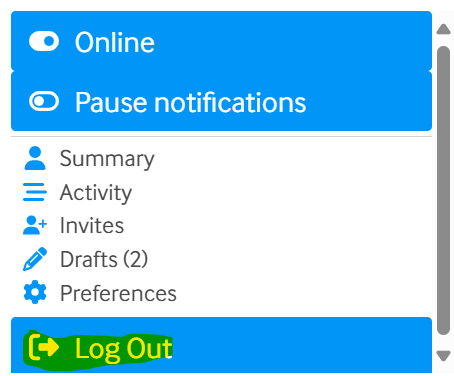
Click, “Log out” and you will be logged out.
If you have any trouble, please do let me know and I can log you out from my side.
Take good care,
Seaneen
This site is so difficult to use , ???
Hi @Rosalee,
I’m sorry you’re finding it difficult to use the site.
We have a Help guide which walks you through how to use all the different features of the site:
If there’s something specific you’re struggling with, please do let me know and I’ll do my best to help.
Take care
Seaneen